Managed vs Unmanaged Solutions in Dynamics 365 & Power Platform
Introduction
When working with Dynamics 365 and Power Platform, Solutions are the foundation for building and deploying applications.
After understanding what a Solution is, the next important concept is knowing the difference between Managed and Unmanaged Solutions.
Choosing the right solution type is critical for development, deployment, and application lifecycle management.
What is an Unmanaged Solution?
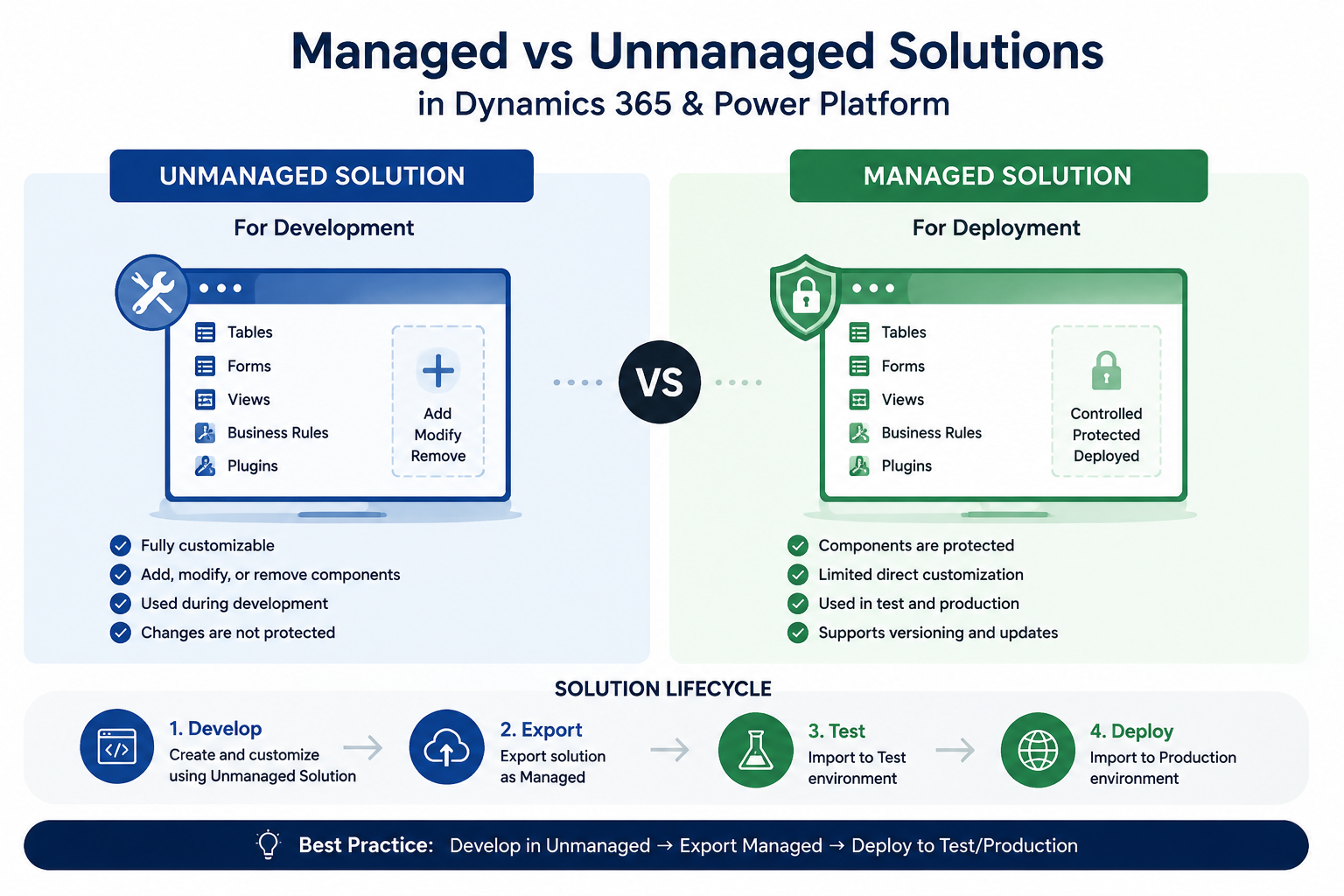
An Unmanaged Solution is mainly used during the development phase.
Developers and consultants use unmanaged solutions when they are actively creating or modifying components.
With an unmanaged solution, you can:
- Add new components
- Modify existing components
- Remove components from the solution
- Customize applications freely
Typical lifecycle:
Development Environment → Unmanaged Solution
Example:
A developer creates:
- Tables
- Forms
- Views
- Business Rules
- Plugins
All changes are stored inside an unmanaged solution.
What is a Managed Solution?
A Managed Solution is used mainly for deployment to environments where you don’t want users to modify the original customization.
Managed solutions are commonly used for:
- Test environments
- Production environments
- Software distribution
With managed solutions:
- Components are protected
- Customizations are controlled
- Updates can be managed through versions
Typical lifecycle:
Development → Export as Managed → Test / Production
Key Differences Between Managed and Unmanaged Solutions
| Feature | Unmanaged Solution | Managed Solution |
|---|---|---|
| Main Usage | Development | Deployment |
| Editable | Yes | Limited |
| Used in Production | Usually No | Yes |
| Supports Versioning | Limited | Better control |
| Protects Components | No | Yes |
A Real-World Example
Imagine you are developing a CRM application.
In Development:
You create a Customer Management module using an unmanaged solution.
After testing:
You export the solution as managed and import it into the Production environment.
Users can use the application, but the original development components remain controlled.
Solution Layers and Managed Solutions
One of the most important concepts related to managed solutions is Solution Layers.
When multiple solutions modify the same component, Dynamics 365 uses layers to determine which customization is active.
Understanding managed solutions is the first step toward understanding:
- Solution Layers
- Dependencies
- Patches
- Upgrades
Best Practices
For most enterprise projects:
✅ Develop using unmanaged solutions
✅ Export managed solutions for production deployment
✅ Keep solutions modular
✅ Use meaningful publishers and version numbers
✅ Avoid unmanaged changes directly in production
Conclusion
Managed and Unmanaged Solutions are not just two export options.
They represent two different stages of the application lifecycle.
Understanding when and why to use each one is essential for anyone working with Dynamics 365 and Power Platform.