How to Execute Multiple Workflows in Dynamics 365 Using XrmToolBox
Managing workflows is a common task for Dynamics 365 administrators and consultants.
Sometimes, during development, testing, or system maintenance, we need to execute the same workflow for multiple records.
But what happens when you have hundreds of records?
Running workflows manually one by one is not practical and can take a significant amount of time.
The Challenge
Imagine you have 250 records that require the same workflow execution.
The traditional approach would be:
- Open each record
- Run the workflow manually
- Wait for completion
- Repeat the process
This approach is time-consuming and increases the possibility of human error.
The Solution: Bulk Workflow Execution in XrmToolBox
XrmToolBox provides several useful tools for Dynamics 365 professionals.
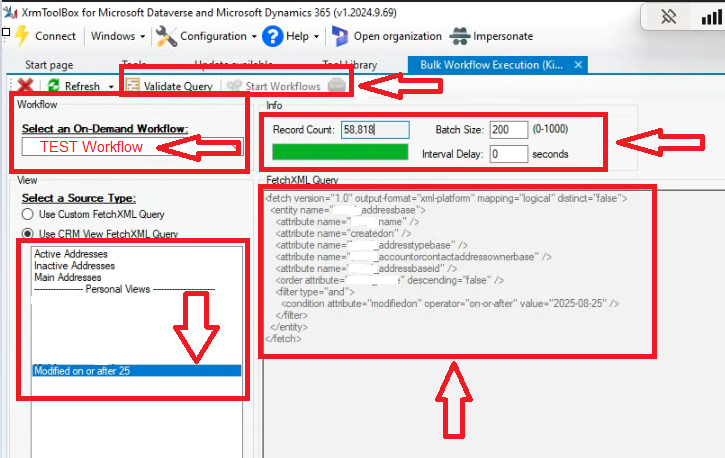
One of these tools is Bulk Workflow Execution, which allows users to execute workflows for multiple records at once.
With this tool, you can:
- Select the target entity
- Choose the workflow
- Define the records to process
- Execute the workflow in bulk
How to Use Bulk Workflow Execution
Step 1: Select the Entity
First, choose the entity that contains the records where you want to execute the workflow.
Step 2: Select the Workflow
Choose the workflow you want to run.
Make sure the workflow is activated and available for execution.
Step 3: Configure Batch Size
One important setting is Batch Size.
Batch Size determines how many records are processed in each execution batch.
Choosing an appropriate value can help manage performance and avoid unnecessary load on the system.
Step 4: Run the Process
After configuration, start the execution process.
The tool will process records automatically instead of requiring manual execution for each record.
Important Note: Background Execution
For large numbers of records, background execution is usually a better option.
It allows the process to continue without keeping the user interface open and provides better control over long-running operations.
Final Thoughts
Tools like Bulk Workflow Execution show the power of the Dynamics 365 community.
Instead of spending hours performing repetitive tasks manually, consultants can use the right tools to improve productivity and deliver solutions faster.
Special thanks to the creators and contributors of XrmToolBox for providing valuable tools for the Dynamics 365 community.